Follow me on Twitter RSS FEED

Followers

Share

PUSAT AKSES MAKLUMAT LINK [FREE DOWNLOAD]'s Fan Box

Make Windows 7 Desktop like Mac OS X Snow Leopard

Posted in By zalberto razrel 0 comments

Make Windows 7 Desktop like Mac OS X Snow Leopard with Snow transformation pack (STP) you can make this happen. Snow transformation pack is the latest software innovation from Windows X’s Live. With this software you can transform your windows 7 desktop and make it like Mac OS X Snow Leopard. Snow Transformation Pack only work and support for windows 7 and windows vista and work on both 32bit and 64 bit version but its not compatible with windows XP.

This Transformation Pack will transform your Vista and windows 7 user interface to Mac OS X Snow Leopard, including Snow Leopard Welcome Screen, icons, wallpaper, Visual Style, Sounds, Dock and much more. The latest version, Snow transformation pack 1.0 released three days ago on August 2nd, 2010.

STP-1 Snow Leopard tranformation Pack


Tips how to install Snow transformation pack

I read the STP discussion board; some user cannot install this software on their windows 7 or Vista. To prevent blocked by UAC on windows 7 or vista you must install this software as administrator. Here how:

  1. After download the transformation pack. Right click on Snow Transformation Pack 1.0.exe and select Run as administrator
  2. Click next then follow the installation process.
  3. After installation process finished clicks transform
  4. After all process finished, restart your computer to take effect.

Download Snow Transformation installer from following link: http://www.winxsoft.com/stp/download.html

HOW TO PROTECT YOUR PENDRIVE FROM VIRUS

Posted in By zalberto razrel 0 comments

Bagaimana nak set write protected pada thumbdrive

Blog - Daddy & Dunia IT

Seperti yang semua tahu virus/ worm/ trojan/ spyware dan segala macam jenis dan gelaran lagi pada script-script programming yang tak mendatangkan manfaat ni sangat mudah menjangkiti thumdrive (pendrive, flashdrive atau apa juga nama yang korang gelar). Especially for those yang menggunakan public PC seperti komputer di Lab faculty atau perpustakaan sekolah (yang boleh dikatakan tempat beranaknya virus-virus ni). Jadi once thumbdrive korang dah ter-infected, jadi kalau lepas pada tu korang cucuk kat mana-mana PC lain, korang hanya akan menyebarkan virus tersebut ke PC lain pula.

Dan andai kata PC tersebut ada antivirus dengan pattern terkini, maka file-file korang yang dah terinfeksi mungkin akan dikuarantinkan. Tambah malang bila file-file tersebut adalah file-file penting seperti thesis atau assignment-assignment korang. Lebih malang bila itulah saja satu-satunya salinan file yang korang ada tanpa ada satu backup file pun di komputer lain. Trust me, I know that feeling~!

Jadi antara solution yang paling mudah adalah menjadikan thumbdrive kita sebagai 'write protected'. Jadi bila mana kita cucuk flash disk tersebut ke mana-mana PC sekalipun terutama yang mempunyai virus (antara yg terkenal satu masa dulu adalah JambanMu dan MaxTrox) ia tidak boleh 'menyalin diri mereka' (duplicate themself) ke dalam pendrive kita.

Tapi sekarang bukan itu sebab aku mencari solution untuk menjadikan thumbdrive aku 'write protected'. Benda ni penting untuk aku kerana aku ada sebatang Pendrive yang aku muatkan dengan set-set installer yang biasa aku gunakan samada untuk repair PC rosak ataupun untuk kegunaan sendiri. Sebelum ni aku gunakan CD. Cuma masalah yang aku hadapi kadang-kadang laptop yang dihantar CDRom nya dah tak boleh berfungsi. Jadi Thumbdrive merupakan salah satu alternatif memandangkan kapasiti yang lebih besar dan rata-rata PC dan laptop memang semuanya ada port USB. Cuma masalahnya VIRUS!

So aku jumpa solution ni di internet juga. Selain dari korang beli PenDrive yang sememangnya dah didatangi dengan tongle ON/OFF protection, atau built-in security software, sebenarnya ada trick mudah untuk menjadikan thumbdrive kita write protected. Dari pemerhatian aku, ada 2 cara;

  • Dengan mengedit registry pada PC kita (yang mana pada aku agak lari dari motif sebenar. Sebab thumb drive hanya jadi write protedted bila di cucuk ke komputer sendiri dan bukannya bila dicucuk ke PC lain.)
  • Dengan membuat satu 'Dummy file' untuk menggunakan sepenuh keluasan 'free space' yang masih tinggal dalamthumbdrive kita. By this way, walau sekecil manapun virus tersebut dia tidak boleh untuk masuk ke pendrive sebab tiada ruang kosong.

Okey.. bagaimana caranya? Firstly kita kena make sure berapakan freespace yang tinggal dalam thumbdrive kita.

Bukak My Computer, 'right click' pada thumb-drive korang dan klick 'Properties'. Kita akan dapat lihat paparan seperti diatas. Perhatikan pada size Free Space (warna pink) dan salin angka tersebut.

Kemudian buka 'command promt'. Jika guna XP, simply type 'cmd' pada kotak run. Tetapi untuk VISTA atau Win 7 korang perlukan Administrator access untuk activity ni nanti. jadi di start menu pergi ke All Program>Accessories>Command Promt (right click dan pilih 'Run as administrator')

dalam command promt tadi type: fsutil file createnew F:\KatokHijOo 1300594688
"F" adalah drive bagi thumbdrive aku. Untuk korang mungkin D, E atau huruf lain. Jadi check betul-betul.
"1300594688" adalah ruang free space pada thumdrive aku (rujuk gambarajah sebelumnya). Jadi untuk korang, nombornya tak sama. Check dulu seperti mana langkah yang telah diterangkan sebelumnya.

Korang akan dapati lampu LED pada thumbdrive korang berkelip-kelip. Mungkin lama, dan mungkin sekejap bergantung kepada saiz free space tadi. Tunggu sehingga selesai. Settle!

Abih tu kalau dah thumbdrive jadi write protedted, macamana kita nak OFFkan semula function tu?

Senang jer.. Delete jer la file 'KatOkHijOo' tu tadi.. Pas tuh kalau nak ONkan semula, repeat je step-step tadi.

FACEBOOK HACK.!!!!!

Posted in By zalberto razrel 2 comments

Default Hack Facebook Password Only

Hack Facebook Password Only is available on a new fast direct download service with over 2,210,000 Files to choose from.Download anything with more then 1000+ Kb/s downloading speed. Signup process takes just 10 sec to go. Signup today and enjoy the speed !


Hack Facebook Password Only Download Torrent


Hack Facebook Password Only | 11.89 MB

DOWNLOAD:
Code:
http://hotfile.com/dl/73056641/16caae2/Facebook_Hack_v_1.0_www.maxdl.info.rar.html

Download MediaChance.Dynamic.Photo.HDR.v4.8.retail-FOSI

Posted in By zalberto razrel 0 comments


http://nsa14.casimages.com/img/2010/03/30//100330073055457113.jpg

MediaChance.Dynamic.Photo.HDR.v4.8.retail-FOSI
The High Dynamic Range Imaging is a set of techniques that has been developed nearly 20 years ago to overcome the limitations of electronic devices by combining multiple exposures into one great looking image. A High Dynamic Range photography can be created by taking few photos with different exposure, then combining them in the software into a high dynamic file. The last thing is to tone-map the HDR image so we can see it in our screen, print it, post it on the web and enjoy. Dynamic Photo HDR was created to be fun to use, fast and straight forward. No fiddling with incomprehensible parameters. Not only for Multiple Exposures – Dynamic Photo HDR (DPHDR) can be actually used with a single RAW or JPG image with very good results. Granted, this will not produce the full dynamic range expansion, but the process itself will in fact add a very distinctive “punch” to your image.

Features:

  • Post-Editor – for all the common basic image touch up and tons of effects
  • Adobe Photoshop(tm) plug-in support
  • Light Paint – apply Dynamic Light where you want it by using a brush
  • Three local and four global tone-mapping operators for every taste.
  • Copy Exif data from original file and create new EXIF Thumbnail (through Post-Editor)
  • Real-Time Preview – now you see realtime image feedback while moving sliders
  • Enhanced Quick browser support for RAW files
  • Raw Gamma/WB Options added in the Create New HDR
  • Speed-up of various data functions and GUI improvement
Release name: MediaChance.Dynamic.Photo.HDR.v4.8.retail-FOSI
Size: 14.13 mb

Download
http://hotfile.com/dl/48683495/0e53d1d/mc.d.p.HDR.v4.8.rar.html
OR
http://www.megaupload.com/?d=17WP6MCZ
OR
http://rapidshare.com/files/399551040/MediaChance.Dynamic.Photo.HDR.v4.8.retail-FOSI.rar
OR
http://netload.in/dateidA0ey6aytC/MediaChance.Dynamic.Photo.HDR.v4.8.retail-FOSI.rar.htm

XWindows Dock add MAC OS X Style Dock on Windows

Posted in By zalberto razrel 0 comments

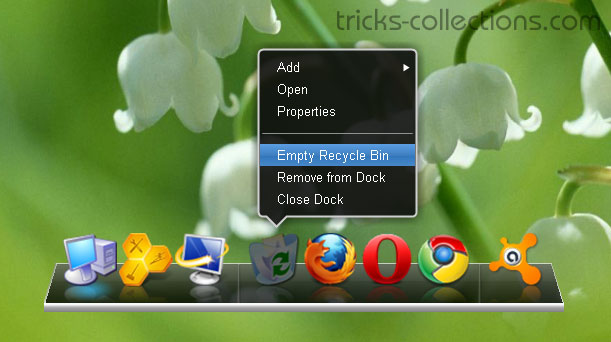
With XWindows Dock you can bring MAC OS X Style Dock to Windows you can do it easily. XWindows Dock is a new dock for Windows which is the best Mac dock emulator. It provides all graphics affects like reflections, transparency, shadow, blur, etc. XWindows Dock provides fully compatibilities with Windows 7 and Windows Vista and probably works fine on Windows XP. One interesting feature of the XWindows Dock is you can change the skin on your own XWindows Dock. Here the Screenshot of XWindows Dock when I try on my PC:

XWindows-Dock
Features of XWindows Dock

  • Drag & Drop, let’s use drag & drop everywhere. Set an icon for any application or add whatever you want to see in the dock – just drop it!
  • You can make own skin for XWindows Dock
  • Life reflection, get very realistic software on your own PC. All your actions will be reflected on the dock in real time fast and quality.
  • XWDock supports multi-monitor configuration.
  • Skin should have 2D mode for placing at the top, left or right part of the screen.

Download XWindows Dock

Download Yahoo! Messenger 10 Full Standalone Installer – Yahoo! Messenger 10 Final now available

Posted in By zalberto razrel 0 comments

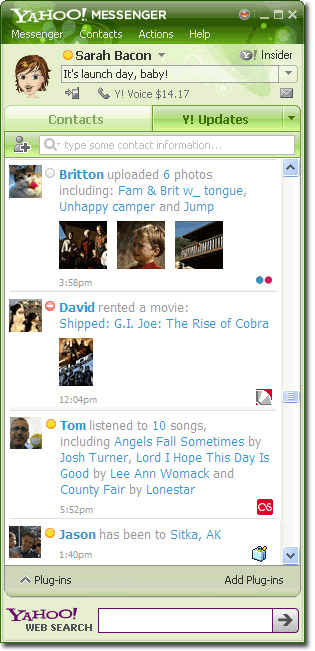
After several months in beta, since 12 nov 2009 Yahoo! Messenger 10Final version available for download. The final version of the Yahoo!Messenger 10 has been incorporated with many bug fixes, including some related to new video call feature as well as improved overall stability.

If you’re a Windows 7 user, you’ll be glad to know this version is compatible with the new operating system. The new Yahoo! Messenger 10 is currently available for Microsoft Windows, Apple Macintosh, mobile devices, iPhone and a web version.
yahoo!-messenger-10-finalUser who prefers the Yahoo! Messenger 10 standalone offline setup installer can use the following direct download links to get the Yahoo! Messenger 10 full installer windows version.

US English version: ymsgr10_us.exe


GOOD LUCK. . .SELAMAT MENCUBA!!

Here How to Download Rapishare files withi RapidIt

Posted in By zalberto razrel 0 comments

Mostly, we use internet to download the latest file and content. If we want to download from Rapidshare, we have to have premium account to download the files without limitation. But to get premium account you must buy the account for some dollar.

Now On this article, I will show you how to download rapidshare files without limitation but without premium account. On internet there are some online tools to download rapishare file easily and we needn’t await several second before download link appear. My favorit tool is RapidIt.

Here How to Download Rapishare files withi RapidIt

  • Open Rapidit website then scroll down to the bottom of website. Copy rapidshare file’s link to the form then click download button. The website will continue with loading process. This process will finish within seconds.
    rapidshare premium link download 1
    rapidshare premium link download  2
  • Once process finished, download the files by clicking “Begin your download” button.
    rapidshare premium link download 3

Send Free SMS messages Worldwide

Posted in By zalberto razrel 0 comments

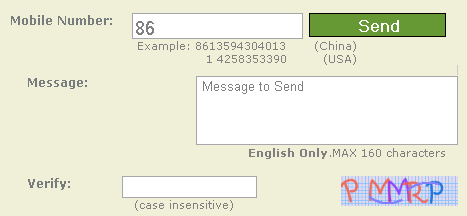
Send free SMS messagesfrom web to any mobile phone worldwide at no cost I recommend using “for-ever.us” website.http://For-ever.us allows users to send free messages to any mobile numbers around the world for free. To send a SMS using this website no registration needed, you just write mobile phone numbers that will send a SMS, write the message you want to send, then click Send button, done. The SMS message will be send to the destination mobile phone number only in just a few second. With this free SMS facility you can tease your friends :D

Some websites that provide free send SMS messages only can send the message to the certain regions/ countries such as India, Kuwait, the U.S. etc. But on http://for-ever.us you can send the SMS to anywhere you want.

How to Send a SMS message using for-ever.us website

  1. Open the website at: http://for-ever.us/
  2. Enter the phone number to send messages, write messages (Message: Max 160 characters) and verification code then click Send
    send free sms
  3. If you see this messages you SMS has been sent to destination number. If you want send another message you can click “here“ link
    sms send

aduiii....

Posted in By zalberto razrel 0 comments

bOrink kottttt!!!!!!

mEyh2..masUk meyh. . .

Posted in By zalberto razrel 1 comments

dOwnload jaa apa nk. . .okiey. . .

HARINI HARI PEMBUKAAN BLOG AKU...

Posted in By zalberto razrel 1 comments

Der pe2 yg x sempurna juz kOmen2 taw...k
Design by: WPYAG
Blogger Template by Anshul | Funny Pictures.